

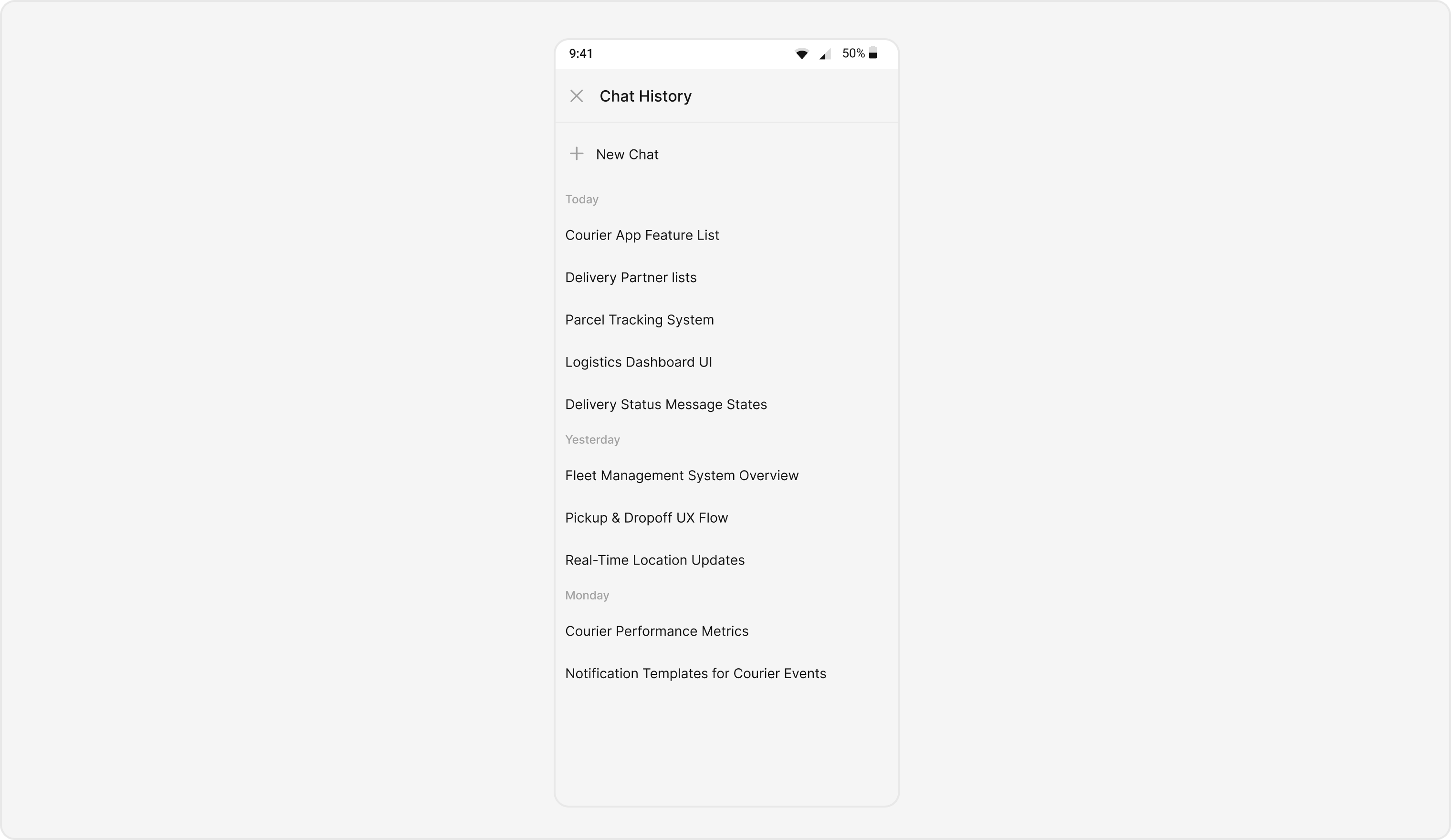
CometChatAIAssistanceChatHistory component displays past conversations between users and AI assistants. Users can review previous AI interactions and start new conversations.
AI Agent Component Spec
AI Agent Component Spec
Report incorrect code
Copy
Ask AI
{
  "component": "CometChatAIAssistanceChatHistory",
  "package": "CometChatUIKitSwift",
  "import": "import CometChatUIKitSwift\nimport CometChatSDK",
  "description": "Displays past conversations between users and AI assistants",
  "inherits": "UIViewController",
  "primaryOutput": {
    "callback": "onItemClick",
    "type": "(AIConversation) -> Void"
  },
  "props": {
    "data": {
      "user": { "type": "User?", "default": "nil" },
      "group": { "type": "Group?", "default": "nil" }
    },
    "callbacks": {
      "onItemClick": "(AIConversation) -> Void",
      "onBack": "() -> Void",
      "onError": "(CometChatException) -> Void"
    }
  },
  "events": [],
  "sdkListeners": [],
  "compositionExample": {
    "description": "AIAssistanceChatHistory shows previous AI conversations for a user or group",
    "components": ["CometChatAIAssistanceChatHistory", "CometChatMessages"],
    "flow": "User opens AI history → selects conversation → views full AI chat"
  }
}
Prerequisites
Install CometChat UI Kit
Add to your Podfile:Run
Report incorrect code
Copy
Ask AI
pod 'CometChatUIKitSwift', '5.1.7'
pod installEnable AI Features
Go to CometChat Dashboard → AI → Enable AI features
Initialize CometChat
Report incorrect code
Copy
Ask AI
import CometChatUIKitSwift

let uikitSettings = UIKitSettings()
    .set(appID: "YOUR_APP_ID")
    .set(authKey: "YOUR_AUTH_KEY")
    .set(region: "YOUR_REGION")
    .build()

CometChatUIKit.init(uiKitSettings: uikitSettings) { result in
    switch result {
    case .success:
        CometChatUIKit.login(uid: "USER_ID") { _ in }
    case .failure(let error):
        print(error.localizedDescription)
    }
}
Basic Implementation
- Swift
Report incorrect code
Copy
Ask AI
import UIKit
import CometChatUIKitSwift
import CometChatSDK

class ViewController: UIViewController {

    var user: CometChat.User!

    func showAIChatHistory() {
        let chatHistory = CometChatAIAssistanceChatHistory()
        chatHistory.user = user  // Required!

        navigationController?.pushViewController(chatHistory, animated: true)
    }
}
You must set either
user or group. Without this, only a loading indicator will display.Production-Ready Implementation
Complete implementation with all features:- Swift
Report incorrect code
Copy
Ask AI
import UIKit
import CometChatUIKitSwift
import CometChatSDK

class AIAssistantViewController: UIViewController {

    // MARK: - Properties
    private var user: CometChat.User!
    private var chatHistoryComponent: CometChatAIAssistanceChatHistory!

    // MARK: - Initialization
    convenience init(user: CometChat.User) {
        self.init()
        self.user = user
    }

    // MARK: - Lifecycle
    override func viewDidLoad() {
        super.viewDidLoad()
        setupChatHistory()
    }

    // MARK: - Setup
    private func setupChatHistory() {
        chatHistoryComponent = CometChatAIAssistanceChatHistory()
        chatHistoryComponent.user = user

        // Configure callbacks
        setupCallbacks()

        // Configure styling
        setupStyling()

        // Configure date formatting
        setupDateFormatting()

        // Configure empty/error states
        setupStateViews()

        // Present
        navigationController?.pushViewController(chatHistoryComponent, animated: true)
    }

    // MARK: - Callbacks
    private func setupCallbacks() {
        // New chat button tapped
        chatHistoryComponent.onNewChatButtonClicked = { [weak self] in
            self?.startNewAIChat()
        }

        // Message tapped
        chatHistoryComponent.onMessageClicked = { [weak self] message in
            self?.handleMessageTap(message)
        }

        // Data loaded successfully
        chatHistoryComponent.set(onLoad: { messages in
            print("✅ Loaded \(messages.count) AI messages")
        })

        // No data available
        chatHistoryComponent.set(onEmpty: { [weak self] in
            print("📭 No AI chat history")
        })

        // Error occurred
        chatHistoryComponent.set(onError: { [weak self] error in
            self?.showError(error.localizedDescription)
        })
    }

    // MARK: - Styling
    private func setupStyling() {
        let style = AiAssistantChatHistoryStyle()

        // Background
        style.backgroundColor = .systemBackground

        // Item text
        style.itemTextFont = UIFont.systemFont(ofSize: 16, weight: .medium)
        style.itemTextColor = .label

        // New chat button
        style.newChatTitleFont = UIFont.systemFont(ofSize: 18, weight: .bold)
        style.newChatTitleColor = .systemBlue

        chatHistoryComponent.style = style
    }

    // MARK: - Date Formatting
    private func setupDateFormatting() {
        // Today's messages
        chatHistoryComponent.dateTimeFormatter.today = { timestamp in
            let date = Date(timeIntervalSince1970: TimeInterval(timestamp))
            let formatter = DateFormatter()
            formatter.timeStyle = .short
            return "Today at \(formatter.string(from: date))"
        }

        // Yesterday's messages
        chatHistoryComponent.dateTimeFormatter.yesterday = { timestamp in
            let date = Date(timeIntervalSince1970: TimeInterval(timestamp))
            let formatter = DateFormatter()
            formatter.timeStyle = .short
            return "Yesterday at \(formatter.string(from: date))"
        }

        // Older messages
        chatHistoryComponent.dateTimeFormatter.otherDay = { timestamp in
            let date = Date(timeIntervalSince1970: TimeInterval(timestamp))
            let formatter = DateFormatter()
            formatter.dateFormat = "MMM d, yyyy 'at' h:mm a"
            return formatter.string(from: date)
        }
    }

    // MARK: - State Views
    private func setupStateViews() {
        // Empty state text
        chatHistoryComponent.emptyStateText = "No AI conversations yet"
        chatHistoryComponent.emptyStateSubtitleText = "Tap 'New Chat' to start talking with AI"

        // Error state text
        chatHistoryComponent.errorStateText = "Couldn't load history"
        chatHistoryComponent.errorStateSubtitleText = "Please check your connection and try again"
    }

    // MARK: - Actions
    private func startNewAIChat() {
        // Option 1: Open messages view for new AI chat
        let messagesVC = CometChatMessages()
        messagesVC.user = user
        navigationController?.pushViewController(messagesVC, animated: true)

        // Option 2: Show action sheet with options
        // showNewChatOptions()
    }

    private func handleMessageTap(_ message: BaseMessage) {
        print("Tapped message ID: \(message.id)")
        print("Message text: \(message.text ?? "No text")")

        // Show message details or continue conversation
        let alert = UIAlertController(
            title: "Message",
            message: message.text,
            preferredStyle: .alert
        )
        alert.addAction(UIAlertAction(title: "Continue Chat", style: .default) { [weak self] _ in
            self?.continueChat(from: message)
        })
        alert.addAction(UIAlertAction(title: "Close", style: .cancel))
        present(alert, animated: true)
    }

    private func continueChat(from message: BaseMessage) {
        let messagesVC = CometChatMessages()
        messagesVC.user = user
        navigationController?.pushViewController(messagesVC, animated: true)
    }

    private func showError(_ message: String) {
        let alert = UIAlertController(
            title: "Error",
            message: message,
            preferredStyle: .alert
        )
        alert.addAction(UIAlertAction(title: "Retry", style: .default) { [weak self] _ in
            self?.setupChatHistory()
        })
        alert.addAction(UIAlertAction(title: "Cancel", style: .cancel))
        present(alert, animated: true)
    }
}
Custom Views
Custom Loading View
- Swift
Report incorrect code
Copy
Ask AI
let chatHistory = CometChatAIAssistanceChatHistory()
chatHistory.user = user

// Custom loading indicator
let loadingView = UIActivityIndicatorView(style: .large)
loadingView.color = .systemBlue
loadingView.startAnimating()

chatHistory.set(loadingView: loadingView)
Custom Empty State View
- Swift
Report incorrect code
Copy
Ask AI
import UIKit
import CometChatUIKitSwift

class CustomEmptyView: UIView {

    private let imageView: UIImageView = {
        let iv = UIImageView()
        iv.image = UIImage(systemName: "sparkles")
        iv.tintColor = .systemBlue
        iv.contentMode = .scaleAspectFit
        iv.translatesAutoresizingMaskIntoConstraints = false
        return iv
    }()

    private let titleLabel: UILabel = {
        let label = UILabel()
        label.text = "No AI Conversations"
        label.font = .systemFont(ofSize: 20, weight: .bold)
        label.textAlignment = .center
        label.translatesAutoresizingMaskIntoConstraints = false
        return label
    }()

    private let subtitleLabel: UILabel = {
        let label = UILabel()
        label.text = "Start a conversation with AI to see it here"
        label.font = .systemFont(ofSize: 16)
        label.textColor = .secondaryLabel
        label.textAlignment = .center
        label.numberOfLines = 0
        label.translatesAutoresizingMaskIntoConstraints = false
        return label
    }()

    let startChatButton: UIButton = {
        let button = UIButton(type: .system)
        button.setTitle("Start New Chat", for: .normal)
        button.titleLabel?.font = .systemFont(ofSize: 16, weight: .semibold)
        button.backgroundColor = .systemBlue
        button.setTitleColor(.white, for: .normal)
        button.layer.cornerRadius = 12
        button.translatesAutoresizingMaskIntoConstraints = false
        return button
    }()

    override init(frame: CGRect) {
        super.init(frame: frame)
        setupUI()
    }

    required init?(coder: NSCoder) {
        fatalError("init(coder:) has not been implemented")
    }

    private func setupUI() {
        addSubview(imageView)
        addSubview(titleLabel)
        addSubview(subtitleLabel)
        addSubview(startChatButton)

        NSLayoutConstraint.activate([
            imageView.centerXAnchor.constraint(equalTo: centerXAnchor),
            imageView.centerYAnchor.constraint(equalTo: centerYAnchor, constant: -80),
            imageView.widthAnchor.constraint(equalToConstant: 80),
            imageView.heightAnchor.constraint(equalToConstant: 80),

            titleLabel.topAnchor.constraint(equalTo: imageView.bottomAnchor, constant: 24),
            titleLabel.leadingAnchor.constraint(equalTo: leadingAnchor, constant: 32),
            titleLabel.trailingAnchor.constraint(equalTo: trailingAnchor, constant: -32),

            subtitleLabel.topAnchor.constraint(equalTo: titleLabel.bottomAnchor, constant: 8),
            subtitleLabel.leadingAnchor.constraint(equalTo: leadingAnchor, constant: 32),
            subtitleLabel.trailingAnchor.constraint(equalTo: trailingAnchor, constant: -32),

            startChatButton.topAnchor.constraint(equalTo: subtitleLabel.bottomAnchor, constant: 24),
            startChatButton.centerXAnchor.constraint(equalTo: centerXAnchor),
            startChatButton.widthAnchor.constraint(equalToConstant: 180),
            startChatButton.heightAnchor.constraint(equalToConstant: 48)
        ])
    }
}

// Usage
let chatHistory = CometChatAIAssistanceChatHistory()
chatHistory.user = user

let emptyView = CustomEmptyView()
emptyView.startChatButton.addTarget(self, action: #selector(startNewChat), for: .touchUpInside)

chatHistory.set(emptyView: emptyView)
Custom Error State View
- Swift
Report incorrect code
Copy
Ask AI
import UIKit
import CometChatUIKitSwift

class CustomErrorView: UIView {

    private let iconView: UIImageView = {
        let iv = UIImageView()
        iv.image = UIImage(systemName: "exclamationmark.triangle")
        iv.tintColor = .systemRed
        iv.contentMode = .scaleAspectFit
        iv.translatesAutoresizingMaskIntoConstraints = false
        return iv
    }()

    private let titleLabel: UILabel = {
        let label = UILabel()
        label.text = "Something went wrong"
        label.font = .systemFont(ofSize: 18, weight: .semibold)
        label.textAlignment = .center
        label.translatesAutoresizingMaskIntoConstraints = false
        return label
    }()

    private let messageLabel: UILabel = {
        let label = UILabel()
        label.text = "We couldn't load your AI chat history.\nPlease check your connection."
        label.font = .systemFont(ofSize: 14)
        label.textColor = .secondaryLabel
        label.textAlignment = .center
        label.numberOfLines = 0
        label.translatesAutoresizingMaskIntoConstraints = false
        return label
    }()

    let retryButton: UIButton = {
        let button = UIButton(type: .system)
        button.setTitle("Try Again", for: .normal)
        button.titleLabel?.font = .systemFont(ofSize: 16, weight: .medium)
        button.backgroundColor = .systemBlue
        button.setTitleColor(.white, for: .normal)
        button.layer.cornerRadius = 10
        button.translatesAutoresizingMaskIntoConstraints = false
        return button
    }()

    override init(frame: CGRect) {
        super.init(frame: frame)
        setupUI()
    }

    required init?(coder: NSCoder) {
        fatalError("init(coder:) has not been implemented")
    }

    private func setupUI() {
        addSubview(iconView)
        addSubview(titleLabel)
        addSubview(messageLabel)
        addSubview(retryButton)

        NSLayoutConstraint.activate([
            iconView.centerXAnchor.constraint(equalTo: centerXAnchor),
            iconView.centerYAnchor.constraint(equalTo: centerYAnchor, constant: -60),
            iconView.widthAnchor.constraint(equalToConstant: 60),
            iconView.heightAnchor.constraint(equalToConstant: 60),

            titleLabel.topAnchor.constraint(equalTo: iconView.bottomAnchor, constant: 16),
            titleLabel.leadingAnchor.constraint(equalTo: leadingAnchor, constant: 24),
            titleLabel.trailingAnchor.constraint(equalTo: trailingAnchor, constant: -24),

            messageLabel.topAnchor.constraint(equalTo: titleLabel.bottomAnchor, constant: 8),
            messageLabel.leadingAnchor.constraint(equalTo: leadingAnchor, constant: 24),
            messageLabel.trailingAnchor.constraint(equalTo: trailingAnchor, constant: -24),

            retryButton.topAnchor.constraint(equalTo: messageLabel.bottomAnchor, constant: 20),
            retryButton.centerXAnchor.constraint(equalTo: centerXAnchor),
            retryButton.widthAnchor.constraint(equalToConstant: 140),
            retryButton.heightAnchor.constraint(equalToConstant: 44)
        ])
    }
}

// Usage
let chatHistory = CometChatAIAssistanceChatHistory()
chatHistory.user = user

let errorView = CustomErrorView()
errorView.retryButton.addTarget(self, action: #selector(retryLoading), for: .touchUpInside)

chatHistory.set(errorView: errorView)
Filter Messages
Customize which messages are displayed:- Swift
Report incorrect code
Copy
Ask AI
import CometChatSDK
import CometChatUIKitSwift

let chatHistory = CometChatAIAssistanceChatHistory()
chatHistory.user = user

// Create custom message request builder
let builder = MessagesRequest.MessageRequestBuilder()
    .set(uid: user.uid ?? "")
    .set(limit: 50)

chatHistory.set(messagesRequestBuilder: builder)
These parameters are always overridden by the component:
uid/guidtypescategories
Embed in Your App
As a Tab
- Swift
Report incorrect code
Copy
Ask AI
import UIKit
import CometChatUIKitSwift
import CometChatSDK

class MainTabBarController: UITabBarController {

    var currentUser: CometChat.User!

    override func viewDidLoad() {
        super.viewDidLoad()
        fetchUserAndSetupTabs()
    }

    private func fetchUserAndSetupTabs() {
        // Get current logged in user
        guard let user = CometChat.getLoggedInUser() else { return }
        currentUser = user
        setupTabs()
    }

    private func setupTabs() {
        // Chats Tab
        let chatsVC = CometChatConversationsWithMessages()
        let chatsNav = UINavigationController(rootViewController: chatsVC)
        chatsNav.tabBarItem = UITabBarItem(
            title: "Chats",
            image: UIImage(systemName: "message"),
            selectedImage: UIImage(systemName: "message.fill")
        )

        // AI Assistant Tab
        let aiVC = CometChatAIAssistanceChatHistory()
        aiVC.user = currentUser
        aiVC.onNewChatButtonClicked = { [weak self] in
            self?.startNewAIChat()
        }
        let aiNav = UINavigationController(rootViewController: aiVC)
        aiNav.tabBarItem = UITabBarItem(
            title: "AI Assistant",
            image: UIImage(systemName: "sparkles"),
            selectedImage: UIImage(systemName: "sparkles")
        )

        // Users Tab
        let usersVC = CometChatUsersWithMessages()
        let usersNav = UINavigationController(rootViewController: usersVC)
        usersNav.tabBarItem = UITabBarItem(
            title: "Users",
            image: UIImage(systemName: "person.2"),
            selectedImage: UIImage(systemName: "person.2.fill")
        )

        viewControllers = [chatsNav, aiNav, usersNav]
    }

    private func startNewAIChat() {
        let messagesVC = CometChatMessages()
        messagesVC.user = currentUser

        if let nav = selectedViewController as? UINavigationController {
            nav.pushViewController(messagesVC, animated: true)
        }
    }
}
As a Button Action
- Swift
Report incorrect code
Copy
Ask AI
import UIKit
import CometChatUIKitSwift
import CometChatSDK

class ProfileViewController: UIViewController {

    var user: CometChat.User!

    private let aiHistoryButton: UIButton = {
        let button = UIButton(type: .system)
        button.setTitle("View AI Chat History", for: .normal)
        button.setImage(UIImage(systemName: "sparkles"), for: .normal)
        button.backgroundColor = .systemBlue
        button.tintColor = .white
        button.layer.cornerRadius = 12
        button.translatesAutoresizingMaskIntoConstraints = false
        return button
    }()

    override func viewDidLoad() {
        super.viewDidLoad()
        setupUI()
    }

    private func setupUI() {
        view.backgroundColor = .systemBackground
        view.addSubview(aiHistoryButton)

        NSLayoutConstraint.activate([
            aiHistoryButton.centerXAnchor.constraint(equalTo: view.centerXAnchor),
            aiHistoryButton.centerYAnchor.constraint(equalTo: view.centerYAnchor),
            aiHistoryButton.widthAnchor.constraint(equalToConstant: 250),
            aiHistoryButton.heightAnchor.constraint(equalToConstant: 50)
        ])

        aiHistoryButton.addTarget(self, action: #selector(showAIHistory), for: .touchUpInside)
    }

    @objc private func showAIHistory() {
        let chatHistory = CometChatAIAssistanceChatHistory()
        chatHistory.user = user

        chatHistory.onNewChatButtonClicked = { [weak self] in
            let messagesVC = CometChatMessages()
            messagesVC.user = self?.user
            self?.navigationController?.pushViewController(messagesVC, animated: true)
        }

        navigationController?.pushViewController(chatHistory, animated: true)
    }
}
API Reference
Properties
| Property | Type | Required | Description |
|---|---|---|---|
user | CometChat.User | Yes* | User for AI chat history |
group | CometChat.Group | Yes* | Group for AI chat history |
style | AiAssistantChatHistoryStyle | No | Custom styling |
emptyStateText | String | No | Empty state title |
emptyStateSubtitleText | String | No | Empty state subtitle |
errorStateText | String | No | Error state title |
errorStateSubtitleText | String | No | Error state subtitle |
hideDateSeparator | Bool | No | Hide date separators |
backButton | UIButton | No | Custom back button |
user or group is required
Callbacks
| Method | Parameters | Description |
|---|---|---|
onNewChatButtonClicked | () -> Void | New chat button tapped |
onMessageClicked | (BaseMessage) -> Void | Message tapped |
set(onLoad:) | ([BaseMessage]) -> Void | Data loaded |
set(onEmpty:) | () -> Void | No data |
set(onError:) | (Error) -> Void | Error occurred |
Custom Views
| Method | Parameters | Description |
|---|---|---|
set(loadingView:) | UIView | Custom loading view |
set(emptyView:) | UIView | Custom empty state |
set(errorView:) | UIView | Custom error state |
set(messagesRequestBuilder:) | MessagesRequestBuilder | Filter messages |
Style Properties (AiAssistantChatHistoryStyle)
| Property | Type | Description |
|---|---|---|
backgroundColor | UIColor | Background color |
itemTextFont | UIFont | Message text font |
itemTextColor | UIColor | Message text color |
newChatTitleFont | UIFont | New chat button font |
newChatTitleColor | UIColor | New chat button color |
Troubleshooting
| Problem | Solution |
|---|---|
| Only loading indicator shows | Set user or group property |
| No messages displayed | Enable AI features in CometChat Dashboard |
| Styling not applied | Apply style before presenting view |
| Callbacks not firing | Set callbacks before pushing to navigation |
| Empty state not showing | Check set(onEmpty:) callback |
Related
- AI Features Overview - All AI features
- Message List - Chat message display
- Message Composer - Message input
- Components Overview - All components