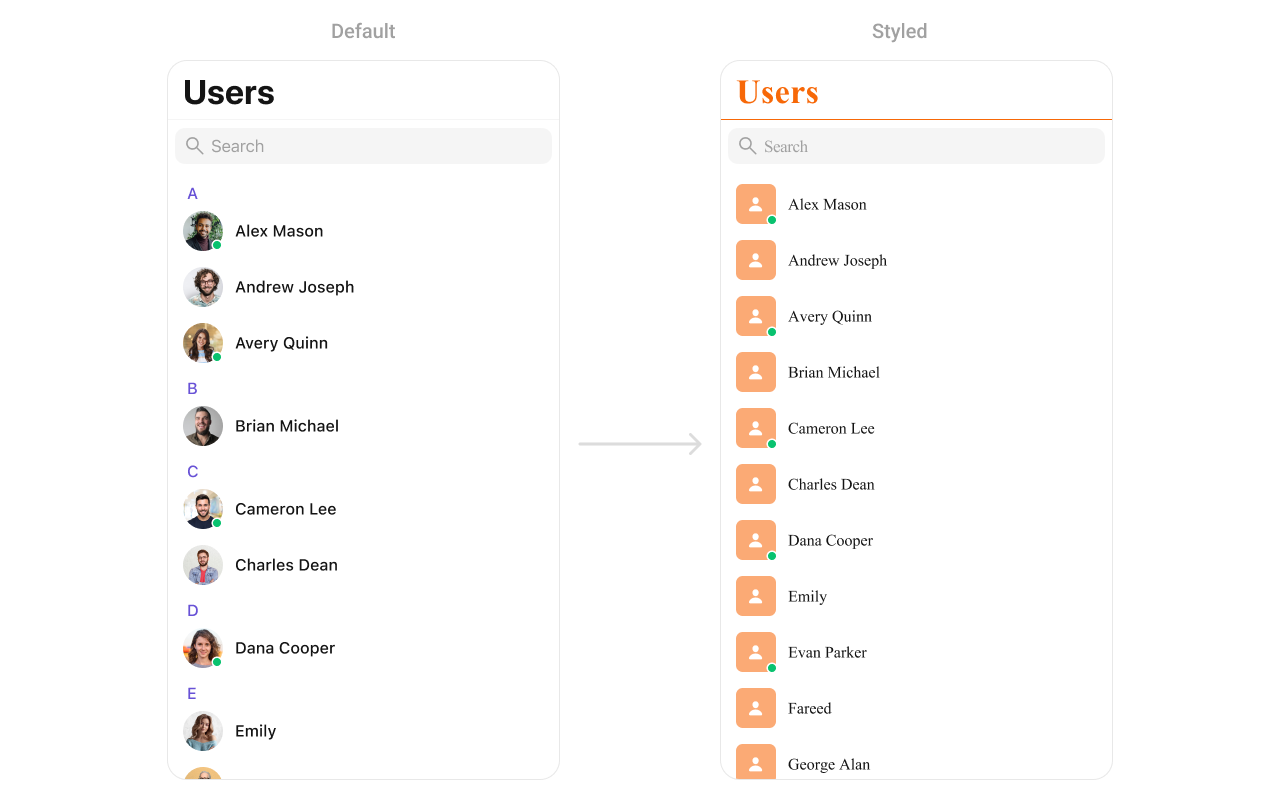
The CometChatUsers component displays a searchable list of all available users. It shows user names, avatars, and online/offline status indicators. Users can be filtered, searched, and selected for starting conversations.
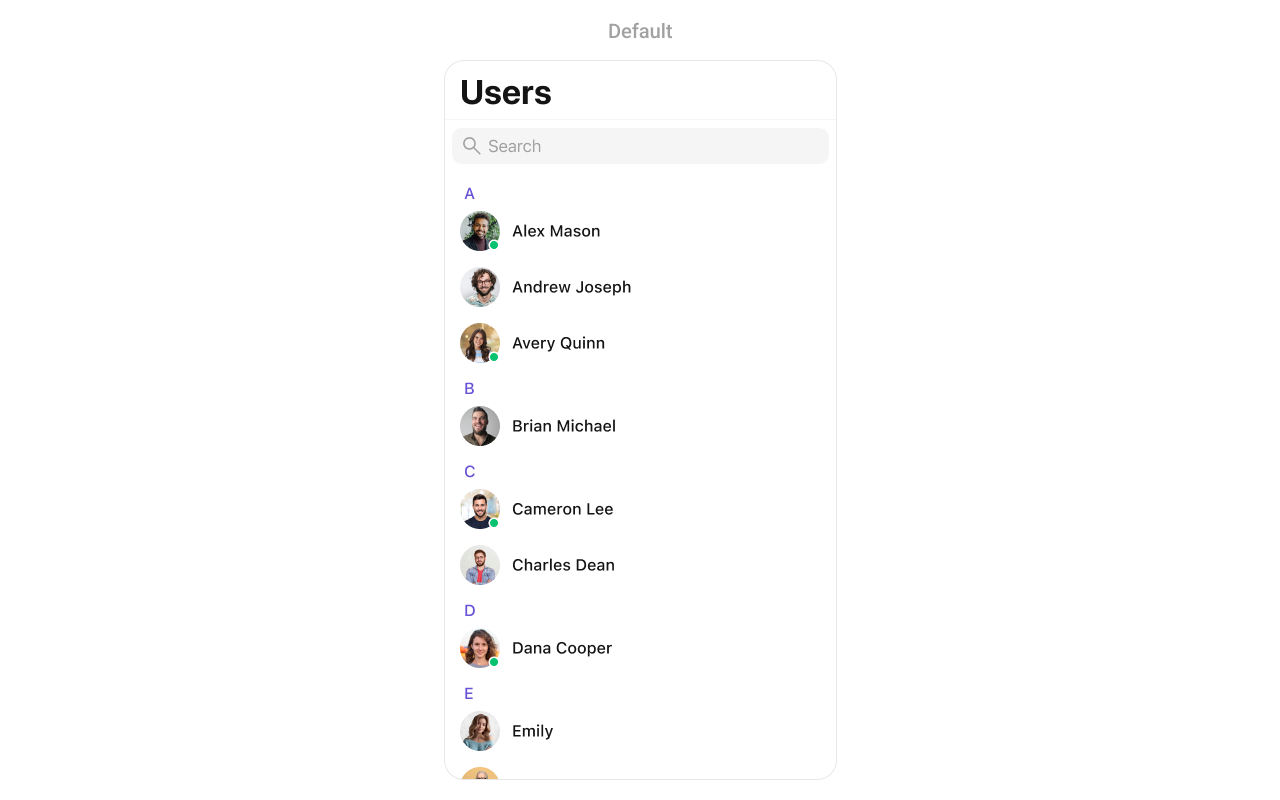
{
  "component": "CometChatUsers",
  "package": "CometChatUIKitSwift",
  "import": "import CometChatUIKitSwift\nimport CometChatSDK",
  "description": "Displays a searchable list of all available users with avatars, names, and online/offline status indicators.",
  "inherits": "UIViewController",
  "primaryOutput": {
    "callback": "onItemClick",
    "type": "(User, IndexPath) -> Void"
  },
  "props": {
    "data": {
      "usersRequestBuilder": {
        "type": "UsersRequest.UsersRequestBuilder?",
        "default": "nil",
        "note": "Custom request builder for filtering users"
      },
      "searchRequestBuilder": {
        "type": "UsersRequest.UsersRequestBuilder?",
        "default": "nil",
        "note": "Custom request builder for search"
      }
    },
    "callbacks": {
      "onItemClick": "(User, IndexPath) -> Void",
      "onItemLongClick": "(User, IndexPath) -> Void",
      "onBack": "() -> Void",
      "onSelection": "([User]) -> Void",
      "onError": "(CometChatException) -> Void",
      "onEmpty": "() -> Void",
      "onLoad": "([[User]]) -> Void"
    },
    "visibility": {
      "hideSearch": { "type": "Bool", "default": false },
      "hideNavigationBar": { "type": "Bool", "default": false },
      "hideBackButton": { "type": "Bool", "default": false },
      "hideUserStatus": { "type": "Bool", "default": false },
      "hideSectionHeader": { "type": "Bool", "default": false },
      "hideErrorView": { "type": "Bool", "default": false },
      "hideLoadingState": { "type": "Bool", "default": false }
    },
    "selection": {
      "selectionMode": { "type": "SelectionMode", "default": ".none" }
    },
    "viewSlots": {
      "listItemView": "(User) -> UIView",
      "leadingView": "(User) -> UIView",
      "titleView": "(User?) -> UIView",
      "subtitleView": "(User?) -> UIView",
      "trailingView": "(User?) -> UIView",
      "emptyStateView": "() -> UIView",
      "errorStateView": "() -> UIView",
      "loadingStateView": "() -> UIView"
    }
  },
  "events": [
    {
      "name": "ccUserBlocked",
      "payload": "User",
      "description": "Fires when a user is blocked"
    },
    {
      "name": "ccUserUnblocked",
      "payload": "User",
      "description": "Fires when a user is unblocked"
    }
  ],
  "sdkListeners": [
    "onUserOnline",
    "onUserOffline"
  ],
  "compositionExample": {
    "description": "Users list for starting new conversations",
    "components": ["CometChatUsers", "CometChatMessages"],
    "flow": "User taps on a user → onItemClick fires → Navigate to CometChatMessages with selected user"
  },
  "types": {
    "User": {
      "uid": "String",
      "name": "String",
      "avatar": "String?",
      "status": "UserStatus",
      "role": "String?"
    },
    "UserStatus": {
      "online": "User is currently online",
      "offline": "User is currently offline"
    }
  }
}

Where It Fits

CometChatUsers displays all available users for starting new conversations. It’s typically used as a standalone screen or within a tab view controller.
import UIKit
import CometChatUIKitSwift
import CometChatSDK

class UsersViewController: UIViewController {
    
    override func viewDidLoad() {
        super.viewDidLoad()
        setupUsers()
    }
    
    private func setupUsers() {
        let usersController = CometChatUsers()
        
        // Handle user selection - start a conversation
        usersController.set(onItemClick: { [weak self] user, indexPath in
            self?.startConversation(with: user)
        })
        
        let navController = UINavigationController(rootViewController: usersController)
        present(navController, animated: true)
    }
    
    private func startConversation(with user: User) {
        let messagesVC = CometChatMessages()
        messagesVC.set(user: user)
        navigationController?.pushViewController(messagesVC, animated: true)
    }
}

Minimal Render

import CometChatUIKitSwift

let users = CometChatUsers()
let navController = UINavigationController(rootViewController: users)
present(navController, animated: true)

Filtering

Use UsersRequest.UsersRequestBuilder to filter which users appear in the list. The builder pattern allows chaining multiple filter conditions.
import CometChatUIKitSwift
import CometChatSDK

// Create a custom request builder
let usersRequestBuilder = UsersRequest.UsersRequestBuilder(limit: 30)
    .friendsOnly(true)

let users = CometChatUsers(usersRequestBuilder: usersRequestBuilder)

Filter Recipes

RecipeCode
Friends only.friendsOnly(true)
Online users only.set(status: .online)
Search by name.set(searchKeyword: "John")
Filter by role.set(roles: ["admin", "moderator"])
Filter by tags.set(tags: ["premium"])
Hide blocked users.hideBlockedUsers(true)
Limit resultsUsersRequestBuilder(limit: 20)
Specific UIDs.set(UIDs: ["user1", "user2"])

Actions and Events

Callback Props

onItemClick

Fires when a user taps on a user in the list. Use this to start a conversation.
import CometChatUIKitSwift
import CometChatSDK

let users = CometChatUsers()

users.set(onItemClick: { [weak self] user, indexPath in
    guard let self = self else { return }
    
    let messagesVC = CometChatMessages()
    messagesVC.set(user: user)
    self.navigationController?.pushViewController(messagesVC, animated: true)
})

onItemLongClick

Fires when a user long-presses on a user. Use this to show additional options.
import CometChatUIKitSwift
import CometChatSDK

let users = CometChatUsers()

users.set(onItemLongClick: { [weak self] user, indexPath in
    guard let self = self else { return }
    
    let alert = UIAlertController(title: user.name, message: nil, preferredStyle: .actionSheet)
    
    alert.addAction(UIAlertAction(title: "View Profile", style: .default) { _ in
        // View profile
    })
    
    alert.addAction(UIAlertAction(title: "Block User", style: .destructive) { _ in
        // Block user
    })
    
    alert.addAction(UIAlertAction(title: "Cancel", style: .cancel))
    self.present(alert, animated: true)
})

onBack

Fires when the back button is pressed.
import CometChatUIKitSwift

let users = CometChatUsers()

users.set(onBack: { [weak self] in
    self?.navigationController?.popViewController(animated: true)
})

onSelection

Fires when users are selected in selection mode.
import CometChatUIKitSwift
import CometChatSDK

let users = CometChatUsers()
users.selectionMode = .multiple

users.set(onSelection: { [weak self] selectedUsers in
    print("Selected \(selectedUsers.count) users")
})

onError

Fires when an error occurs while loading users.
import CometChatUIKitSwift

let users = CometChatUsers()

users.set(onError: { error in
    print("Error loading users: \(error.errorDescription)")
})

onEmpty

Fires when the user list is empty.
import CometChatUIKitSwift

let users = CometChatUsers()

users.set(onEmpty: {
    print("No users found")
})

onLoad

Fires when users are successfully loaded. The callback receives a nested array where each inner array represents a section of users (grouped alphabetically).
import CometChatUIKitSwift
import CometChatSDK

let users = CometChatUsers()

users.set(onLoad: { userSections in
    let totalUsers = userSections.flatMap { $0 }.count
    print("Loaded \(totalUsers) users across \(userSections.count) sections")
})

Actions Reference

MethodDescriptionExample
set(onItemClick:)Triggered when a user is tappedStart conversation
set(onItemLongClick:)Triggered on long pressShow options menu
set(onBack:)Triggered when back button is pressedCustom navigation
set(onSelection:)Triggered in selection modeMulti-select users
set(onError:)Triggered when an error occursShow error alert
set(onEmpty:)Triggered when list is emptyShow empty state
set(onLoad:)Triggered when users loadAnalytics tracking

Global UI Events

EventFires whenPayload
ccUserBlockedA user is blockedUser
ccUserUnblockedA user is unblockedUser
import CometChatUIKitSwift
import CometChatSDK

class MyViewController: UIViewController, CometChatUserEventListener {
    
    override func viewDidLoad() {
        super.viewDidLoad()
        CometChatUserEvents.addListener("my-listener", self)
    }
    
    override func viewWillDisappear(_ animated: Bool) {
        super.viewWillDisappear(animated)
        CometChatUserEvents.removeListener("my-listener")
    }
    
    func onUserBlock(user: User) {
        print("User blocked: \(user.name ?? "")")
    }
    
    func onUserUnblock(user: User) {
        print("User unblocked: \(user.name ?? "")")
    }
}

SDK Events (Real-Time, Automatic)

SDK ListenerInternal behavior
onUserOnlineUpdates status indicator to online
onUserOfflineUpdates status indicator to offline

Custom View Slots

SlotSignatureReplaces
listItemView(User) -> UIViewEntire user row
leadingView(User) -> UIViewAvatar / left section
titleView(User?) -> UIViewName / title text
subtitleView(User?) -> UIViewStatus / subtitle text
trailingView(User?) -> UIViewRight side content
emptyStateView() -> UIViewEmpty state display
errorStateView() -> UIViewError state display
loadingStateView() -> UIViewLoading state display

listItemView

Replace the entire user row with a custom design.
import UIKit
import CometChatUIKitSwift
import CometChatSDK

let users = CometChatUsers()

users.set(listItemView: { user in
    let customView = UIView()
    customView.backgroundColor = UIColor.systemBackground
    
    let avatar = CometChatAvatar(image: UIImage())
    avatar.setAvatar(avatarUrl: user.avatar, with: user.name ?? "")
    
    let nameLabel = UILabel()
    nameLabel.text = user.name
    nameLabel.font = UIFont.systemFont(ofSize: 16, weight: .semibold)
    
    let statusLabel = UILabel()
    statusLabel.text = user.status == .online ? "🟢 Online" : "⚫ Offline"
    statusLabel.font = UIFont.systemFont(ofSize: 12)
    statusLabel.textColor = UIColor.secondaryLabel
    
    customView.addSubview(avatar)
    customView.addSubview(nameLabel)
    customView.addSubview(statusLabel)
    
    return customView
})

leadingView

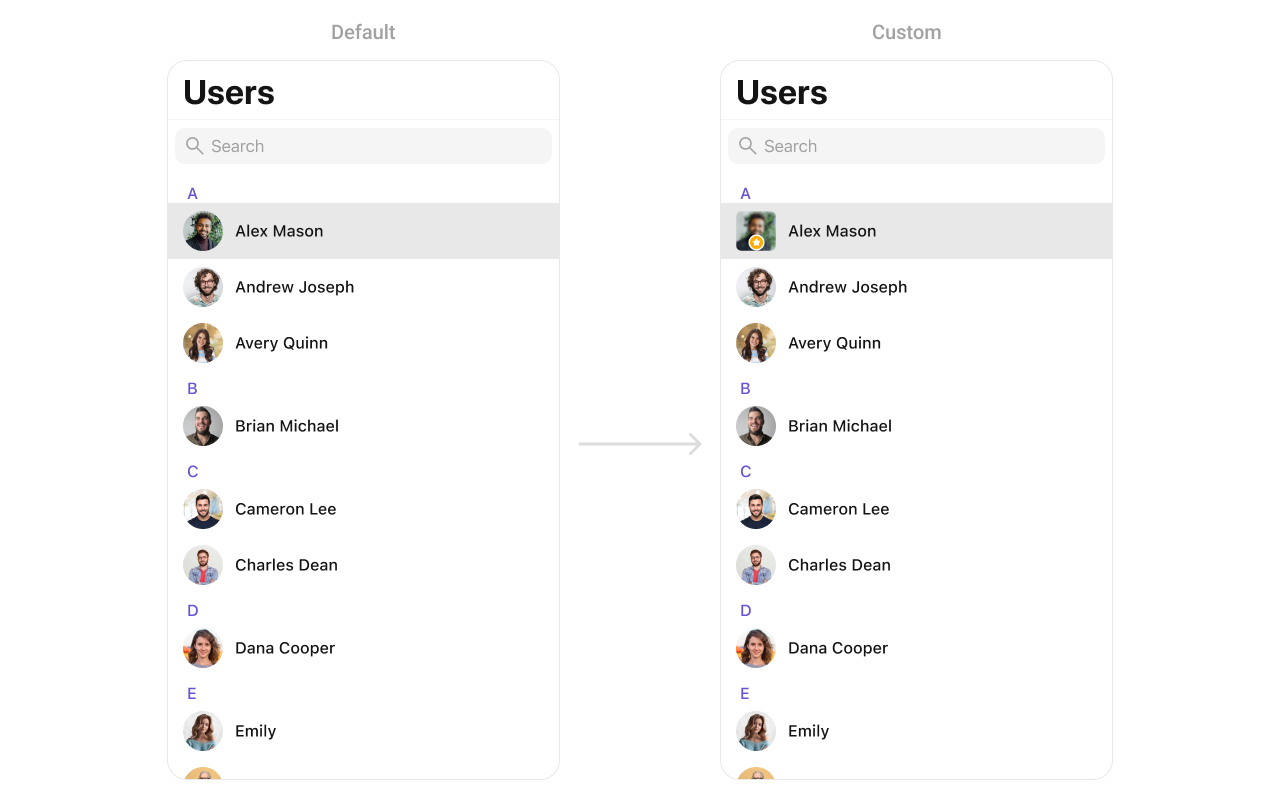
Customize the leading view (avatar area) of a user cell.
import UIKit
import CometChatUIKitSwift
import CometChatSDK

let users = CometChatUsers()

users.set(leadingView: { user in
    let view = CustomLeadingView(image: UIImage(named: "avatar"))
    return view
})
You can create a CustomLeadingView as a custom UIView:
import UIKit

class CustomLeadingView: UIView {
    
    // MARK: - UI Components
    private let imageView: UIImageView = {
        let imageView = UIImageView()
        imageView.contentMode = .scaleAspectFill
        imageView.clipsToBounds = true
        imageView.layer.cornerRadius = 10
        return imageView
    }()
    
    private let badgeView: UIView = {
        let view = UIView()
        view.backgroundColor = .orange
        view.layer.cornerRadius = 12
        view.layer.borderWidth = 2
        view.layer.borderColor = UIColor.white.cgColor
        
        let icon = UIImageView(image: UIImage(systemName: "star.fill"))
        icon.tintColor = .white
        icon.translatesAutoresizingMaskIntoConstraints = false
        view.addSubview(icon)
        
        NSLayoutConstraint.activate([
            icon.centerXAnchor.constraint(equalTo: view.centerXAnchor),
            icon.centerYAnchor.constraint(equalTo: view.centerYAnchor),
            icon.widthAnchor.constraint(equalToConstant: 14),
            icon.heightAnchor.constraint(equalToConstant: 14)
        ])
        
        return view
    }()
    
    // MARK: - Initialization
    init(image: UIImage?) {
        super.init(frame: .zero)
        imageView.image = image
        
        addSubview(imageView)
        addSubview(badgeView)
        
        imageView.translatesAutoresizingMaskIntoConstraints = false
        badgeView.translatesAutoresizingMaskIntoConstraints = false
        
        NSLayoutConstraint.activate([
            imageView.topAnchor.constraint(equalTo: topAnchor),
            imageView.leadingAnchor.constraint(equalTo: leadingAnchor),
            imageView.trailingAnchor.constraint(equalTo: trailingAnchor),
            imageView.bottomAnchor.constraint(equalTo: bottomAnchor),
            
            badgeView.widthAnchor.constraint(equalToConstant: 24),
            badgeView.heightAnchor.constraint(equalToConstant: 24),
            badgeView.bottomAnchor.constraint(equalTo: imageView.bottomAnchor, constant: -4),
            badgeView.trailingAnchor.constraint(equalTo: imageView.trailingAnchor, constant: -4)
        ])
    }

    required init?(coder: NSCoder) {
        fatalError("init(coder:) has not been implemented")
    }
}

titleView

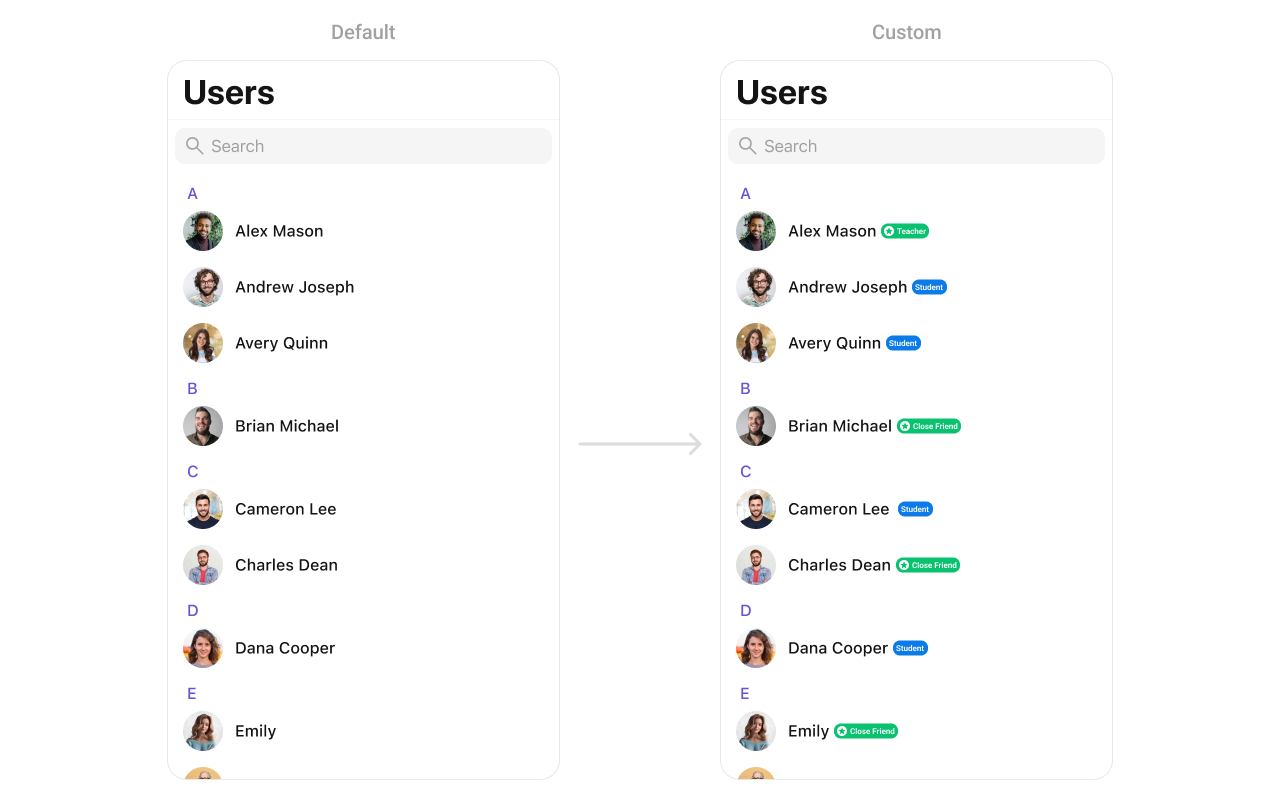
Customize the title view of a user cell.
import UIKit
import CometChatUIKitSwift
import CometChatSDK

let users = CometChatUsers()

users.set(titleView: { user in
    let view = CustomTitleView(name: user.name ?? "", role: "Teacher")
    return view
})
You can create a CustomTitleView as a custom UIView:
import UIKit

class CustomTitleView: UIView {
    
    // MARK: - UI Components
    private let nameLabel: UILabel = {
        let label = UILabel()
        label.font = UIFont.boldSystemFont(ofSize: 18)
        label.textColor = .black
        return label
    }()
    
    private let badgeLabel: UILabel = {
        let label = UILabel()
        label.font = UIFont.systemFont(ofSize: 14)
        label.textColor = .white
        label.backgroundColor = .systemGreen
        label.text = "Teacher"
        label.textAlignment = .center
        label.layer.cornerRadius = 8
        label.layer.masksToBounds = true
        return label
    }()
    
    // MARK: - Initialization
    init(name: String, role: String) {
        super.init(frame: .zero)
        nameLabel.text = name
        badgeLabel.text = " \(role) "
        
        let stackView = UIStackView(arrangedSubviews: [nameLabel, badgeLabel])
        stackView.axis = .horizontal
        stackView.spacing = 8
        stackView.alignment = .center
        
        addSubview(stackView)
        stackView.translatesAutoresizingMaskIntoConstraints = false
        
        NSLayoutConstraint.activate([
            stackView.leadingAnchor.constraint(equalTo: leadingAnchor),
            stackView.trailingAnchor.constraint(equalTo: trailingAnchor),
            stackView.topAnchor.constraint(equalTo: topAnchor),
            stackView.bottomAnchor.constraint(equalTo: bottomAnchor)
        ])
    }

    required init?(coder: NSCoder) {
        fatalError("init(coder:) has not been implemented")
    }
}

subtitleView

Customize the subtitle area below the user name.
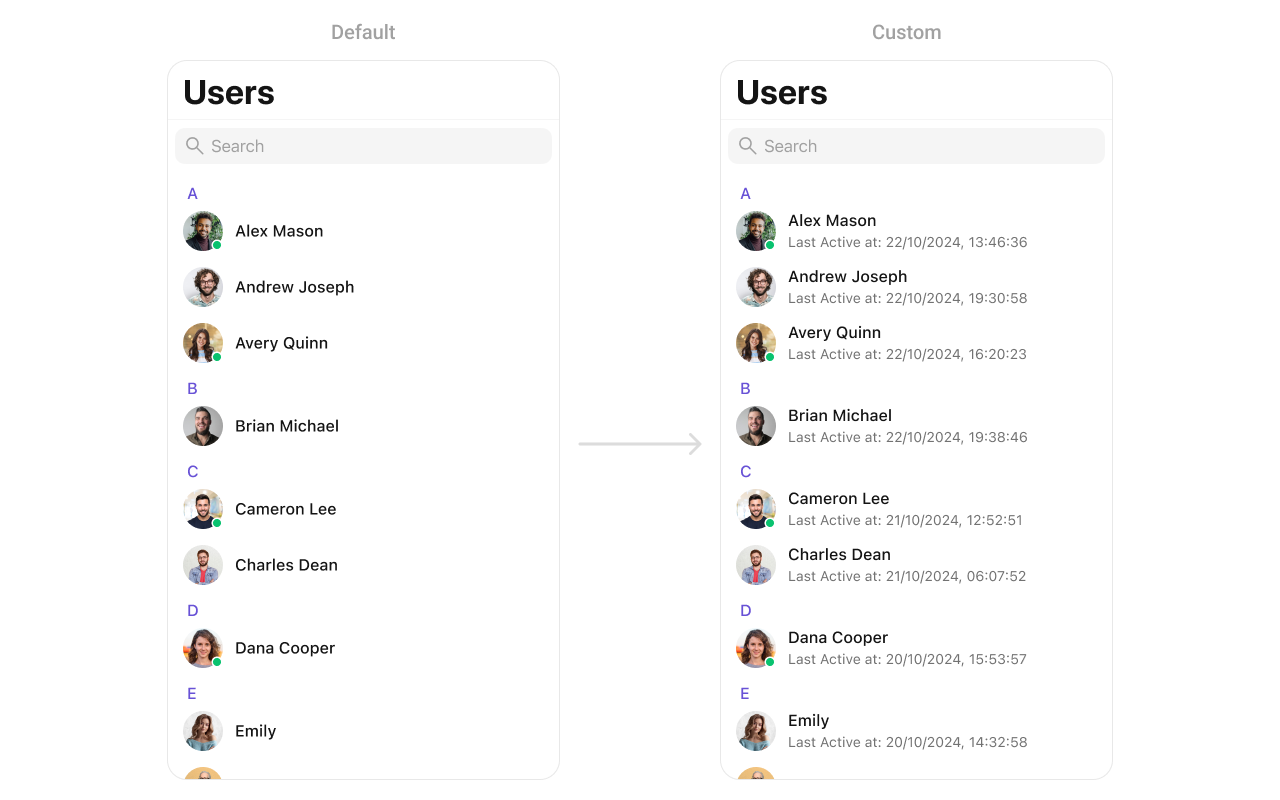
import UIKit
import CometChatUIKitSwift
import CometChatSDK

let users = CometChatUsers()

users.set(subtitleView: { user in
    let view = CustomSubtitleView(lastActiveDate: "2 hours ago")
    return view
})
You can create a CustomSubtitleView as a custom UIView:
import UIKit

class CustomSubtitleView: UILabel {
    
    init(lastActiveDate: String) {
        super.init(frame: .zero)
        self.text = "Last Active at: \(lastActiveDate)"
        self.textColor = UIColor.gray
        self.font = UIFont.systemFont(ofSize: 14)
        self.numberOfLines = 1
    }
    
    required init?(coder: NSCoder) {
        fatalError("init(coder:) has not been implemented")
    }
}

trailingView

Customize the trailing view (right side) of a user cell.
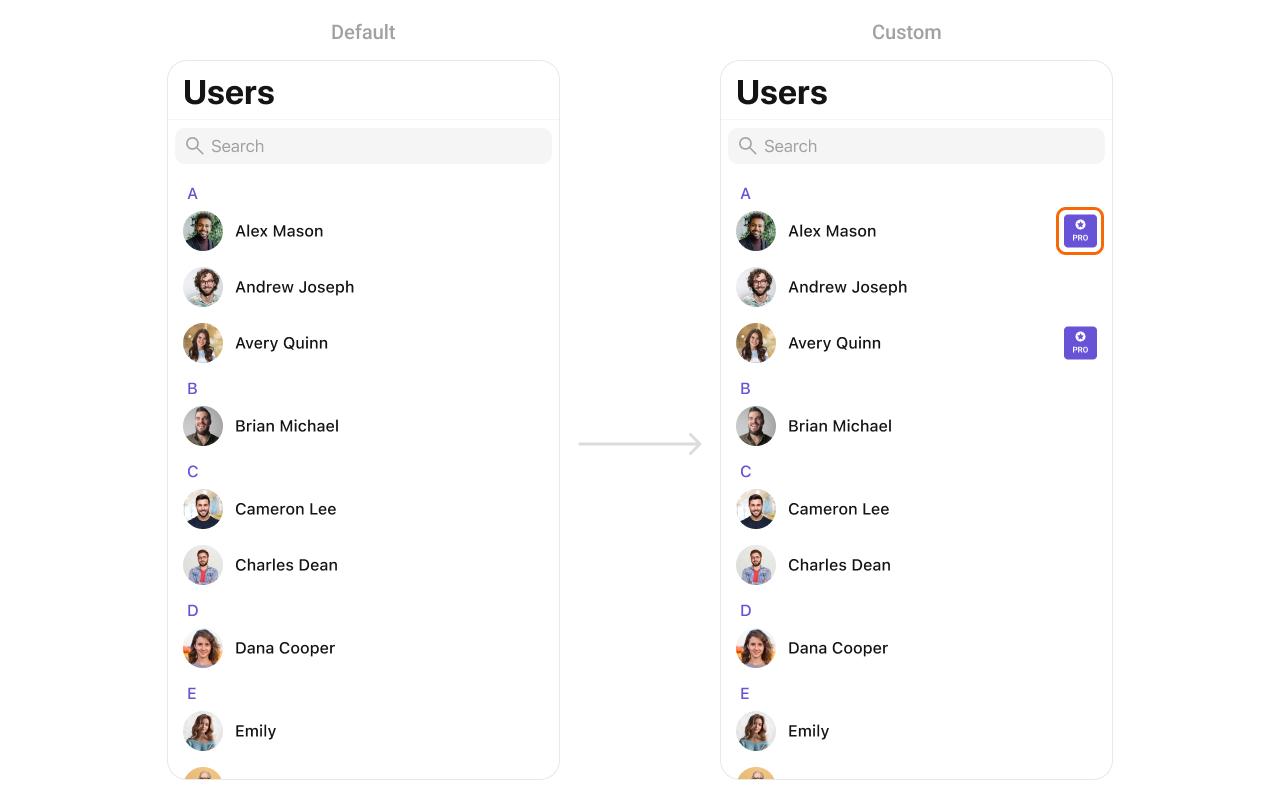
import UIKit
import CometChatUIKitSwift
import CometChatSDK

let users = CometChatUsers()

users.set(trailView: { user in
    let view = CustomTrailView()
    return view
})
You can create a CustomTrailView as a custom UIView:
import UIKit

class CustomTrailView: UIView {
    
    // MARK: - UI Components
    private let badgeView: UIView = {
        let view = UIView()
        view.backgroundColor = .purple
        view.layer.cornerRadius = 12
        view.translatesAutoresizingMaskIntoConstraints = false
        return view
    }()
    
    private let icon: UIImageView = {
        let imageView = UIImageView(image: UIImage(systemName: "star.fill"))
        imageView.tintColor = .white
        imageView.translatesAutoresizingMaskIntoConstraints = false
        return imageView
    }()
    
    private let label: UILabel = {
        let label = UILabel()
        label.text = "PRO"
        label.font = UIFont.boldSystemFont(ofSize: 14)
        label.textColor = .white
        label.translatesAutoresizingMaskIntoConstraints = false
        return label
    }()
    
    // MARK: - Initialization
    init() {
        super.init(frame: .zero)
        
        addSubview(badgeView)
        badgeView.addSubview(icon)
        badgeView.addSubview(label)
        
        NSLayoutConstraint.activate([
            badgeView.leadingAnchor.constraint(equalTo: leadingAnchor),
            badgeView.trailingAnchor.constraint(equalTo: trailingAnchor),
            badgeView.topAnchor.constraint(equalTo: topAnchor),
            badgeView.bottomAnchor.constraint(equalTo: bottomAnchor),
            
            icon.centerXAnchor.constraint(equalTo: badgeView.centerXAnchor),
            icon.topAnchor.constraint(equalTo: badgeView.topAnchor, constant: 4),
            icon.widthAnchor.constraint(equalToConstant: 16),
            icon.heightAnchor.constraint(equalToConstant: 16),
            
            label.centerXAnchor.constraint(equalTo: badgeView.centerXAnchor),
            label.topAnchor.constraint(equalTo: icon.bottomAnchor, constant: 2),
            label.bottomAnchor.constraint(equalTo: badgeView.bottomAnchor, constant: -4)
        ])
    }

    required init?(coder: NSCoder) {
        fatalError("init(coder:) has not been implemented")
    }
}

loadingStateView

Customize the loading state view displayed while data is being fetched.
import UIKit
import CometChatUIKitSwift

let users = CometChatUsers()

let loadingIndicator = UIActivityIndicatorView(style: .medium)
loadingIndicator.startAnimating()
users.set(loadingView: loadingIndicator)

errorStateView

Customize the error state view displayed when an error occurs.
import UIKit
import CometChatUIKitSwift

let users = CometChatUsers()

let errorLabel = UILabel()
errorLabel.text = "Something went wrong!"
errorLabel.textColor = .red
users.set(errorView: errorLabel)

emptyStateView

Customize the empty state view displayed when no users are available.
import UIKit
import CometChatUIKitSwift

let users = CometChatUsers()

let emptyLabel = UILabel()
emptyLabel.text = "No users found"
emptyLabel.textColor = .gray
emptyLabel.textAlignment = .center
users.set(emptyView: emptyLabel)

Options

set(options:)

Define custom options for each user. This method allows you to return an array of CometChatUserOption based on the user object.
import CometChatUIKitSwift
import CometChatSDK

let users = CometChatUsers()

users.set(options: { user in
    return [CometChatUserOption]()
})

add(options:)

Dynamically add options to users. This method lets you return additional CometChatUserOption elements.
import CometChatUIKitSwift
import CometChatSDK

let users = CometChatUsers()

users.add(options: { user in
    return [ArchiveOption()]
})

Custom ListItem

For more complex or unique list items, you can create a custom UIView file named CustomListItem and integrate it into the set(listItemView:) method.
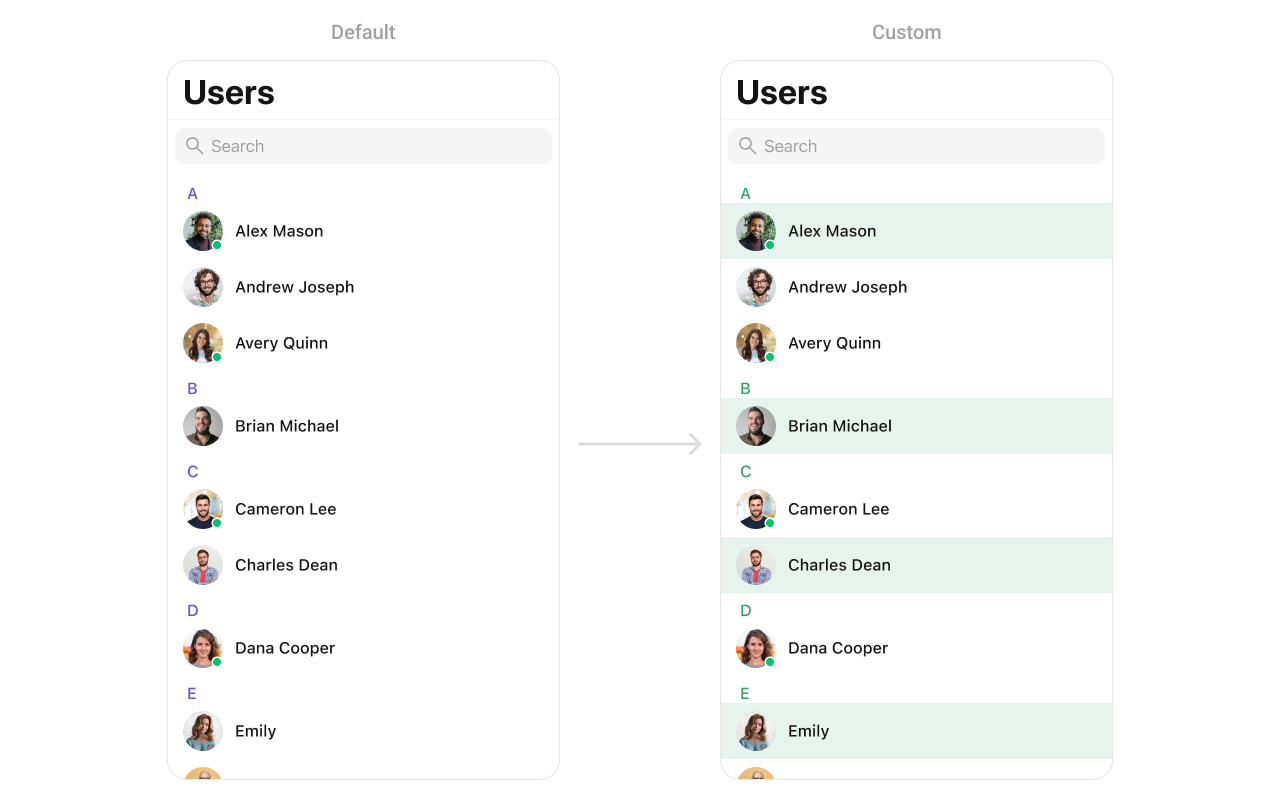
import UIKit
import CometChatUIKitSwift
import CometChatSDK

class CustomListItem: UIView {
    
    // MARK: - UI Components
    private var profileImageView: CometChatAvatar = {
        let imageView = CometChatAvatar(image: UIImage())
        imageView.translatesAutoresizingMaskIntoConstraints = false
        return imageView
    }()

    private var nameLabel: UILabel = {
        let label = UILabel()
        label.translatesAutoresizingMaskIntoConstraints = false
        return label
    }()

    // MARK: - Initialization
    override init(frame: CGRect) {
        super.init(frame: frame)
        setupUI()
    }

    required init?(coder aDecoder: NSCoder) {
        fatalError("init(coder:) has not been implemented")
    }

    // MARK: - Setup
    private func setupUI() {
        addSubview(profileImageView)
        addSubview(nameLabel)

        NSLayoutConstraint.activate([
            // Profile image constraints
            profileImageView.leadingAnchor.constraint(equalTo: leadingAnchor, constant: 8),
            profileImageView.centerYAnchor.constraint(equalTo: centerYAnchor),
            profileImageView.widthAnchor.constraint(equalToConstant: 40),
            profileImageView.heightAnchor.constraint(equalToConstant: 40),
            
            // Name label constraints
            nameLabel.leadingAnchor.constraint(equalTo: profileImageView.trailingAnchor, constant: 8),
            nameLabel.trailingAnchor.constraint(equalTo: trailingAnchor, constant: -8),
            nameLabel.centerYAnchor.constraint(equalTo: centerYAnchor)
        ])
    }

    // MARK: - Configuration
    func set(user: User) {
        nameLabel.text = user.name
        profileImageView.setAvatar(avatarUrl: user.avatar, with: user.name)
    }
}
Usage:
import CometChatUIKitSwift
import CometChatSDK

let users = CometChatUsers()

users.set(listItemView: { user in
    let customItem = CustomListItem()
    customItem.set(user: user)
    return customItem
})

Styling

Style Hierarchy

  1. Global styles (CometChatUsers.style) apply to all instances
  2. Instance styles override global for specific instances

Global Level Styling

import UIKit
import CometChatUIKitSwift

// Apply global styles that affect all CometChatUsers instances
CometChatUsers.style.backgroundColor = UIColor.systemBackground
CometChatUsers.style.titleColor = UIColor.label
CometChatUsers.style.titleFont = UIFont.systemFont(ofSize: 34, weight: .bold)
CometChatUsers.style.listItemTitleTextColor = UIColor.label
CometChatUsers.style.listItemSubTitleTextColor = UIColor.secondaryLabel

// Custom avatar style
let avatarStyle = AvatarStyle()
avatarStyle.cornerRadius = CometChatCornerStyle(cornerRadius: 20)
CometChatUsers.avatarStyle = avatarStyle

Instance Level Styling

import UIKit
import CometChatUIKitSwift

// Create a custom style for a specific instance
var customStyle = UsersStyle()
customStyle.backgroundColor = UIColor(red: 0.95, green: 0.95, blue: 0.97, alpha: 1.0)
customStyle.titleColor = UIColor.darkGray
customStyle.listItemBackground = UIColor.white

let users = CometChatUsers()
users.style = customStyle

Key Style Properties

PropertyTypeDefaultDescription
backgroundColorUIColorCometChatTheme.backgroundColor01Background color
titleColorUIColorCometChatTheme.textColorPrimaryNavigation title color
titleFontUIFontCometChatTypography.Heading4.mediumNavigation title font
listItemTitleTextColorUIColorCometChatTheme.textColorPrimaryUser name color
listItemTitleFontUIFontCometChatTypography.Heading4.mediumUser name font
listItemSubTitleTextColorUIColorCometChatTheme.textColorSecondaryStatus text color
listItemSubTitleFontUIFontCometChatTypography.Body.regularStatus text font
listItemBackgroundUIColor.clearList item background
searchBarBackgroundColorUIColor?nilSearch bar background
searchBarTextColorUIColor?nilSearch bar text color
headerTitleColorUIColorCometChatTheme.textColorHighlightSection header color
headerTitleFontUIFontCometChatTypography.Heading4.mediumSection header font

Customization Matrix

What to changeWhereProperty/APIExample
Background colorStylebackgroundColorUIColor.systemBackground
Title appearanceStyletitleColor, titleFontCustom colors and fonts
List item lookStylelistItemBackgroundUIColor.white
Avatar appearanceStyleavatarStyleAvatarStyle() with custom radius
Search barStylesearchBarBackgroundColorCustom background
Hide searchPropertyhideSearchusers.hideSearch = true
Hide statusPropertyhideUserStatususers.hideUserStatus = true
Custom rowView Slotset(listItemView:)See Custom View Slots

Props

All props are optional. Sorted alphabetically.

hideBackButton

Hides the back button in the navigation bar.
TypeBool
Defaultfalse

hideErrorView

Hides the error state view.
TypeBool
Defaultfalse

hideLoadingState

Hides the loading state indicator.
TypeBool
Defaultfalse

hideNavigationBar

Hides the entire navigation bar.
TypeBool
Defaultfalse

hideSearch

Hides the search bar.
TypeBool
Defaultfalse

hideSectionHeader

Hides the alphabetical section headers.
TypeBool
Defaultfalse

hideUserStatus

Hides online/offline status indicators.
TypeBool
Defaultfalse

searchRequestBuilder

Custom request builder for search functionality.
TypeUsersRequest.UsersRequestBuilder?
Defaultnil

selectionMode

Sets the selection mode for multi-select functionality.
TypeSelectionMode
Default.none

usersRequestBuilder

Custom request builder for filtering users.
TypeUsersRequest.UsersRequestBuilder?
Defaultnil

Events

EventPayloadFires when
ccUserBlockedUserA user is blocked
ccUserUnblockedUserA user is unblocked

Troubleshooting

IssueSolution
Empty user listEnsure SDK is initialized and user is logged in
Users not updating in real-timeCheck SDK connection and presence listeners
Search not workingVerify hideSearch is not set to true
Status not showingCheck that hideUserStatus is not set to true
Custom views not appearingEnsure custom view has proper constraints